ihome ih5

ih5.jpg

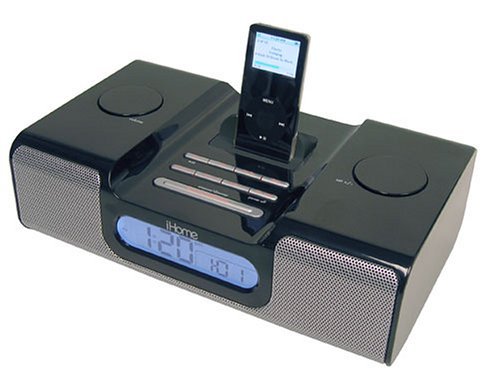
I received the black ih5 for Christmas from my mom. We were looking to replace an aging and partial broken Nakamichi alarm clock/radio/cd player. There were two main reasons we wanted to replace that — the motor that lifted the CD cover was broken so you had to hold the back left arm as it raised and lowered, and the number of cables was ridiculous! There was a sub woofer, and a left and right speaker, with all the controls and CD unit built into one of those. But there were literally 10-15 cables to connect those 3 units, so all it did was collect cat hair and dust behind the bed.

So the ih5 is a nice replacement for that reason because there is just one cable for power. We hadn’t really used the CD player on the old unit that much recently, but now having the ipod there, it’s great to just turn on music in the room for a few minutes. You can also wake to the ipod, but so far the few times I’ve needed to use the alarm I’ve just used the buzzer.

The good:

  • ipod in the bedroom for lost of music
  • sound is relatively good for such a small unit
  • just one wire! 🙂
  • controls are all relatively intuitive

The bad:

  • The unit casts incredible light. It does have 3 settings, the highest of which is like a small black and white tv. Even the lowest setting is fairly bright so we have to cover it at night.
  • To control everything except on/off and volume of the ipod, you have to use the ipod controls. This unit would have been amazing if it would let you control everything via the alarm clock rather than the ipod. Maybe the next generation will have that.
  • The remote control is option and costs an additional $19.95.
  • Overall I’m happy with the unit and would recommend it to anyone with an ipod that wants music in their bedroom.

IOGEAR KVMP and wireless keyboard/mouse combp

In my quest to clean up my desk top at home, I’ve done several things. I started using both my work laptop and home PC at the same time. All things that need a VPN connection (work email, intranet web browsing, SSH to various internal hosts, etc.) are done via the laptop while everything else (IM, web browsing, personal email, music) are done via the home PC. I recently wrote about synergy which allows me to use a single keyboard and mouse to control the two PC’s, and while I’ve had some issues with that and had to go with a hardware KVMP to supplement the software KM synergy, it has worked fairly well.

The KVMP I got is the IOGEAR GCS1734:

gkm521r.jpg

It’s alot fancier than some on the market but what drew me to it was the fact that it allows you to share USB peripherals (thus the “P”). Once I switched from SSH tunnels on my work laptop to VPN, I lost the ability to do anything on my local home network, including printing via a shared printer, without quiting the VPN. But with the USB printer plugged into the KVMP, I can switch it over to my work laptop and print. I also think I will do this with an external drive at some point.

I’m actually using the KVMP as a KMP — no video switching. I’m using two screens for the two computers. This is a four port unit though I’m only using two now, but I like the upgrade option if I ever add a home linux server or even a mac mini. 🙂 The unit comes with four cables that include audio, video (vga), and the USB connection, so you can also share audio between multiple PC’s to one set of speakers, though I’m not doing that now.

Overall the unit is pretty nice, but I was using a 5 or 6 year old keyboard and mouse that came with an old Aptiva. So I thought I’d upgrade and I thought wireless may work well in order to continue the clean up. I first tried a wireless Microsoft comfort keyboard/mouse combo, and was fairly happy with it. It did have a lot of extraneous keys that I’d never use, but I really liked the slight curvature of the keyboard. Not quite as radical as a fully ergonomic keyboard, but just a nice curve to keep the wrists at good angles.

Alas, the microsoft keyboard did not work at all with the h/w KVMP. After some research it turns out that almost no wireless keyboard/mouse combos work with any KVM’s — or at least they are not supported. So if it does work, you are kind of lucky.

IOGEAR told me that they have a wireless keyboard/mouse combo, the GKM521R, that would work with their KVMP. I picked it up for about $10 after rebates from Amazon! Overall it does work fairly well, but you do lose the keyboard control of volume, being able to open up web, mail, or the calculater from a single button, etc.

What is nice about using the IOGEAR keyboard with their KVMP is that the hot keys do work. So I can hit “scrl-lock, scrl-lock, #, enter” to switch to the PC on port #. Or if you just want to swtich the key board and mouse, and not the USB peripherals, hit “scrl-lock, scrl-lock, #, k, enter.”

At first I was not crazy about the tactile feedback of the IOGEAR compared to the microsoft unit or my very old keyboard, but it has grown on me. However, the backspace key is too small — a normal sized key instead of a double key, and that has been hard for me to get used to. In addition, the Enter key is quite large, and I often hit it when I’m trying to use the pipe “|” key. Another thing that drives me crazy is the mouse uses rechargable batteries, and I have not yet gotten used to charging it, so it often dies on me.

I may switch to an MSFT comfort curve wired keyboard at some point, though I’m told some of the keys like volume control, open calculater, etc., won’t work as the KVMP is an emualted one, not a non-emulated one. Sigh. A couple of wires aren’t going to kill me.

Synergy

Synergy is a pretty neat little software utility that acts as a “KM” switch, where K = Keyboard and M = Mouse. Normally folks use hardware KVM switches to control two or more computers using one keyboard, mouse, and video display. In this case, software is used to control two PC’s each with their own video head.

My set up is a bit strange so it’s not quite as stable as I’d like, so I do have a traditional HW KVM (I’ll review what I have sometime soon) for those times when synergy fails. What is difficult in my situation is that one of my stations is VPN’d in for work, while the other is a home PC. Since I don’t have a static IP for my DSL connection, I 1st had to setup dyndns so that my IP is findable via DNS. I then had to set up a port forward for synergy on my router to always send the synergy port to my PC that acts as the server. Then my VPN’d box is a client of the server, and uses the dyndns host name to reach it.

The reason this is a bit flaky is that all the packets that go back and forth are now going across the Internet to my VPN end point rather than just on the local network. Or if I’m not VPN’d in and don’t change the synergy configuration, the packets are still not passed locally.

About 80% of the time this works fine. Every once in a while it gets a little slow when working on the VPN box, and then every once in a while it fails totally. So I do have the hardware switch I can use.

Overall, though, I think synergy is great! I wish I could be VPN’d in and have the synergy packets flow locally, but that is not possible with our VPN s/w.

One thing that is great about a s/w KM vs. a h/w version is that you can actually cut and paste between PC’s!

Pandora

Check out http://www.pandora.com. It’s a (somewhat) new web service that touts itself as a music discovery service. You can enter a few artists or songs that you like, and then it begins to stream music to you based on that information. You can then give thumbs up or thumbs down to the music to further tune your “station.”

They’ve undertaken what they call the “Music Genome” project, in which they’ve listened to and analyzed tons of songs, and categorized them (or more accurately categorized many characteristics of them). So based on the input you give it of what you like, they play you songs that have similar characteristics.

So far I’m fairly impressed, though I’m only in day 2. I’ve given it a few artists like Dar Williams, Holly Cole and Donna the Buffalo, that I thought might be too obscure, and they actually recognized them and have played a fair number of Dar songs. No Holly Cole or Donna the Buffalo yet, so my guess is that they don’t have licenses to play those two (yet).

Their web page says they have about 300,000 tracks now. While this doesn’t come near Apple’s 2-3 million, it’s a good start for something that is really only a few months old. Personally I’d like to be able to feed it my iTunes library, at least the play count number of the songs, and have it build my station that way.

At any rate, I wouldn’t be surprised to see one of the major Internet music services purchase Pandora at some point down the road. While I can’t see Apple doing it since they don’t have a subcription model (though Pandora does have an advertising agreement with them as well as Amazon)). Yahoo purchased MusicMatch, which had a similar “recommendation” feature though it was not done as a “genome” project. So I’m not so sure about them. Maybe Napster?

If you want to listen to my radio station that I’ve been working on the past 2 days, click here:

2sparrows radio